


Before changing or restoring a CNC controller, back up more than part programs: include controller configuration, parameter files, machine units, axis or joint definitions, motion settings, custom paths, tool and offset data, PLC/I/O logic, drive and feedback data, safety-related notes, and a restore-verification record.
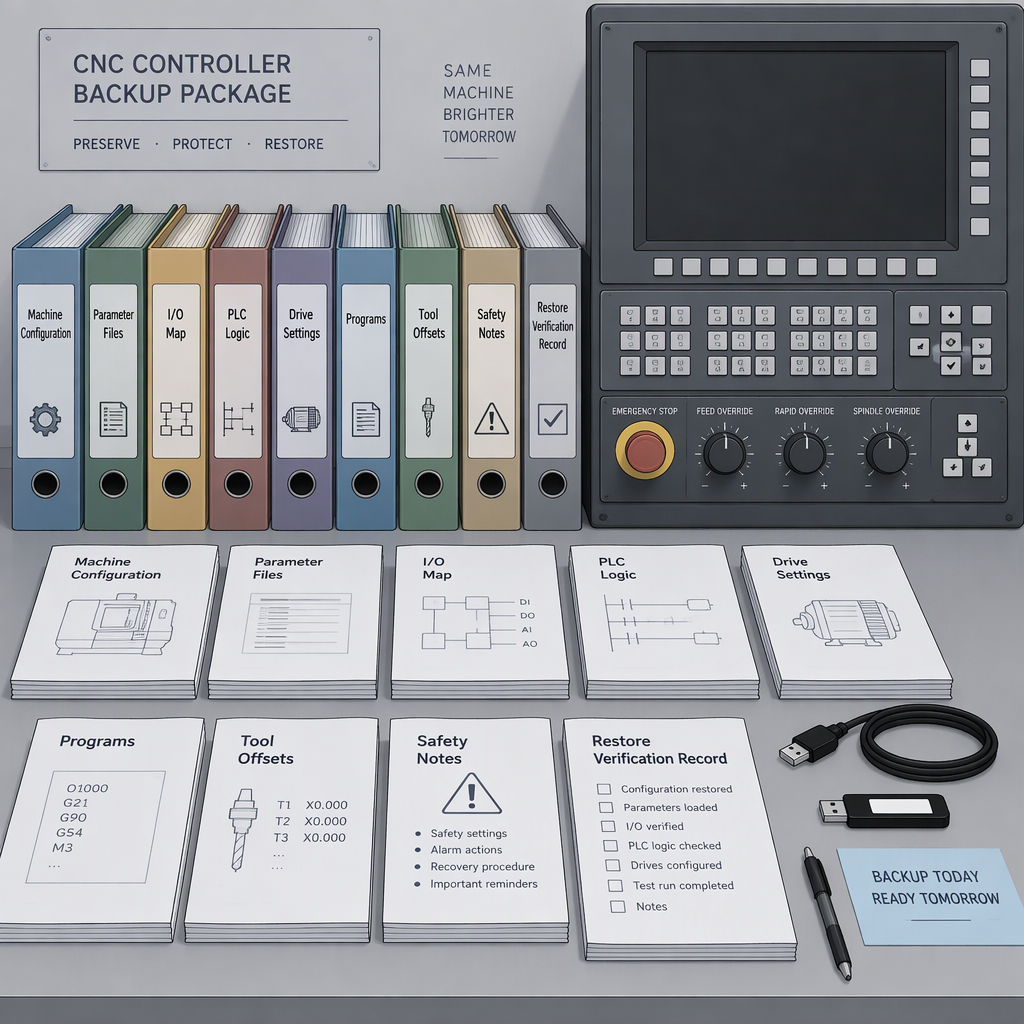
What to back up before changing or restoring a CNC controller
A complete CNC controller backup should capture the machine behavior package, not only the visible machining programs: configuration files, parameter files, units, axis and joint definitions, trajectory or motion settings, tool and offset data, custom program paths, and any linked control files that the controller uses.
In LinuxCNC, for example, INI configuration can point to HAL files, RS274NGC parameter files, program directories, tool editors, user-interface behavior, axis and joint settings, and other machine details; that makes it a useful general model for thinking about backup scope, while not defining the exact files required by every proprietary control.
| Backup item | Why it matters before restore | Buyer check |
|---|---|---|
| Controller configuration | May define units, axes, joints, kinematics, startup behavior, and linked files. | Export the full project or archive, not a screenshot of values. |
| Parameter and path files | Parameter files and program paths can affect what the control loads after restore. | Record file locations and controller software context. |
| Programs, tools, and offsets | Program directories and tool-editor data may be part of the operating environment. | Separate production programs from machine setup data. |
| Safety and re-energizing notes | Controller work may occur during machine servicing where hazardous energy must be controlled. | Identify who owns isolation, test, and release-to-run steps. |
Map the controller data, not just the program folder
Part programs describe jobs; controller data describes the machine environment that runs those jobs, including configuration, linked files, paths, parameters, and axis behavior.
| Data group | Typical buyer question | Restore decision |
|---|---|---|
| Machine configuration | Does the new or restored controller use the same units, axes, joints, and motion assumptions? | Verify before loading production programs. |
| Linked control files | Are HAL, parameter, or equivalent linked files included with the project? | Do not treat the main settings screen as the whole backup. |
| Custom paths and subroutines | Will macros, M-codes, subroutines, and job folders resolve after restore? | Back up both files and path references. |
| Operator records | Which offsets, tool tables, and setup records are needed to restart safely? | Confirm values against machine acceptance records before production. |
Do not separate PLC, I/O, and drive feedback from the backup
PLC, I/O, and feedback data belong in the backup package because controller behavior can depend on linked logic and machine-connection files, not just axis parameters.
- Capture the files or project data that define machine connections and controller behavior.
- Record axis, joint, units, motion, and startup-code assumptions before changing controller hardware or software.
- When supplier materials use terms such as configurable I/O, PLC programming, USB file management, or position-control modes, translate those terms into specific project data the integrator must receive.
- Match every field signal to the electrical drawing, terminal label, sensor or actuator name, and expected normal state.
- List drive model, feedback type, command interface, alarm wiring, enable chain, and any handshaking with external automation.
How to restore without turning a backup into a commissioning risk
Verify the restored controller as a commissioning state: confirm hardware and software context, load the complete project, check paths and parameters, test I/O and axes under controlled conditions, then record the accepted state.
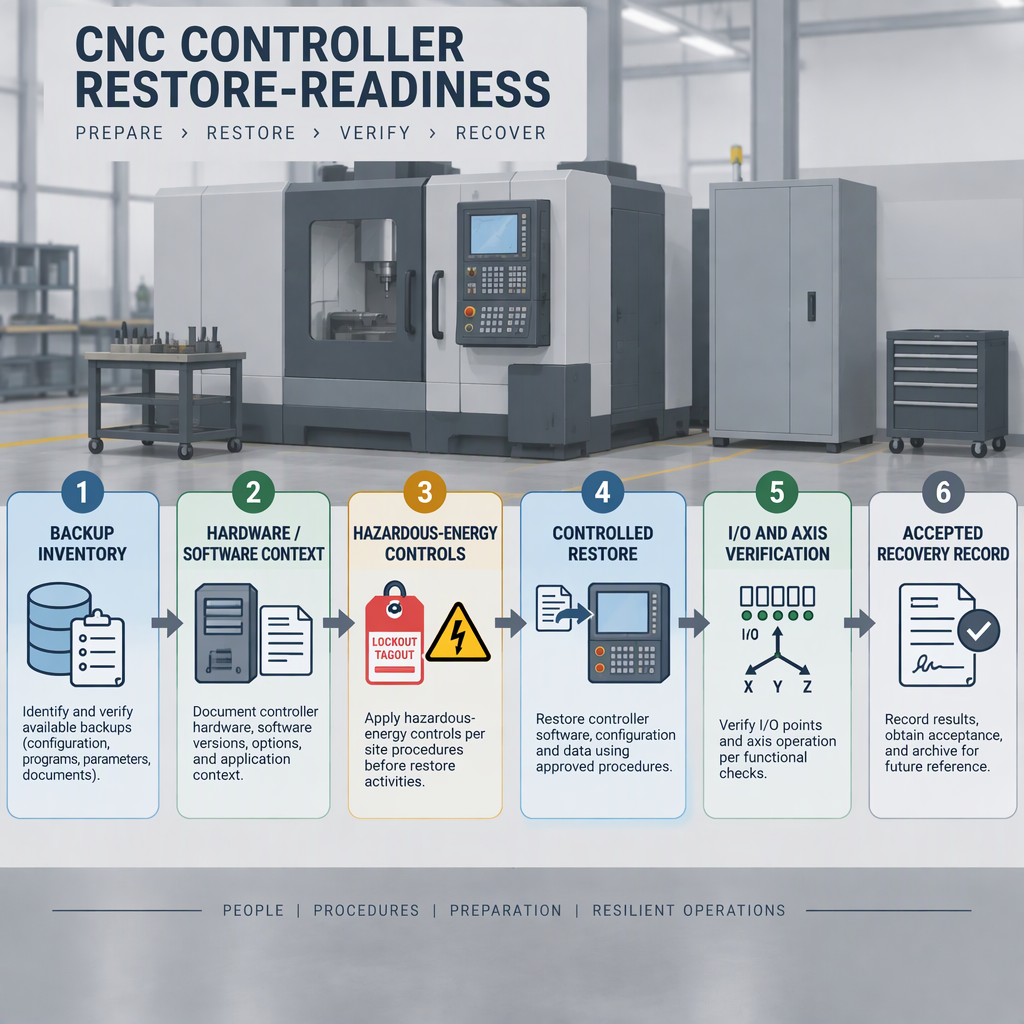
- Before opening cabinets, accessing wiring, replacing a controller, or manually touching powered equipment, switch off the machine and disconnect the applicable electrical power, battery, hydraulic, pneumatic, and other stored-energy sources according to the site lockout procedure.
- Confirm the controller model, software version, units, axes, joints, kinematics, and motion settings expected for the machine.
- Restore the full configuration package, including referenced files, parameter files, paths, tool data, and program directories where applicable.
- Check the I/O map, interlocks, alarms, spindle commands, feed hold, limits, homing, and drive-enable behavior before automatic running.
- Run dry verification and low-risk motion checks before returning the equipment to production conditions.
- Keep a recoverable record of the accepted state so future recovery is testable rather than dependent on memory or a single uncontrolled file copy.
Set the safety boundary before backup, restore, and re-energizing
Before controller replacement, cabinet access, manual wiring checks, or re-energizing after restore, control hazardous energy and prevent unexpected start-up or release of stored energy.
- Switch off and disconnect applicable power sources before manual access to the controller cabinet, wiring, drives, battery-backed modules, or machine mechanisms.
- Control stored energy before hands-on inspection, cleaning, clearing, or replacement work.
- Assign responsibility for isolation, restore loading, I/O testing, axis testing, and release-to-run approval.
- Do not bypass guards, interlocks, door switches, or emergency-stop circuits to make a restore easier.
- Follow the machine builder’s current manual and the site’s safety procedure when the controller backup package does not answer a safety question.
Add integration data when the CNC is part of a robot or automation cell
When a CNC controller is connected to a robot or automation cell, the backup package should include interface data for the whole cell, not only the CNC control.
SZGH groups CNC machines, industrial robot arms, and CNC + Robot Integration in its site navigation, so buyers discussing SZGH-related projects should prepare both CNC and automation-interface information before asking for a restore or retrofit scope.
- Controller-interface data: I/O assignments, PLC logic, position-control assumptions, file-transfer method, and support context.
- Robot handshake data: cycle start, machine ready, door state, chuck or fixture confirmation, alarm reset, and safe stop signals.
- Cell context: robot controller model, gripper or loader signals, guarding concept, peripheral devices, and sequence chart.
- Safety context: energy-isolation ownership and re-energizing sequence for both machine and automation equipment.
RFQ checklist: what to confirm before you ask for a controller restore quote
Send an RFQ package that lets the supplier judge whether the restore is a file-transfer job, a controller retrofit, a drive/interface migration, or a broader commissioning task.
- Machine type, axes, spindle, tool changer, fixtures, and automation interfaces.
- Controller configuration, units, axis or joint definitions, kinematics, motion settings, startup code, custom paths, and parameter files where applicable.
- Program directories, tool data, and any linked files required by the control environment.
- Electrical drawings, I/O list, PLC or ladder project, drive parameters, feedback devices, and alarm history.
- Safety procedure for isolation, controlled re-energizing, and release-to-run verification.
- If the project involves CNC and robot integration, include robot handshake, peripheral, and cell-sequence information.
| If your package contains... | The likely discussion is... | Ask the supplier to confirm... |
|---|---|---|
| Programs only | Backup is not enough for controller restore. | Which configuration and parameter data are missing. |
| Configuration plus linked files | Restore scope can be evaluated more realistically. | Whether paths, parameters, and machine settings match the target controller. |
| Controller plus drive and I/O data | Retrofit or migration risk can be scoped. | Which signals, drives, and feedback devices require testing. |
| Safety and test plan | Commissioning boundary is clearer. | Who controls isolation, re-energizing, and acceptance records. |
Conclusion
A CNC controller backup is ready for restore only when it captures the controller environment, the machine interface, the safety boundary, and the verification record.
- Do not confuse part-program backup with machine-control backup.
- Include configuration, parameters, axes, motion settings, paths, and linked files where applicable.
- Control hazardous energy before hands-on controller work and before re-energizing.
- For retrofit RFQs, give the supplier enough data to separate file restore, controller migration, and commissioning scope.
FAQs about CNC controller backup and restore
These questions help buyers check whether a CNC controller backup restore package is complete enough for a safe scope discussion.
Are part programs enough before restoring a CNC controller?
No. Part programs may be only one directory in a larger controller environment that can also include configuration files, parameter files, paths, tool data, and axis or joint settings.
Which axis and motion data should I record?
Record machine units, axis and joint definitions, kinematics, trajectory or motion settings, startup code, and related parameter files when the controller uses them.
Why include PLC and I/O information?
Controller projects may involve configurable I/O, PLC programming, position-control modes, and file management, so the RFQ should identify signals, logic, drives, feedback, and handshakes instead of asking for a controller swap in isolation.
What must happen before opening the controller cabinet?
Switch off the equipment and disconnect the applicable power or battery sources before manual access, then control stored electrical, mechanical, hydraulic, pneumatic, thermal, and other hazardous energy according to the site procedure.
What changes when the CNC is integrated with a robot?
Include robot and cell-interface data such as handshakes, ready signals, alarm states, peripheral devices, and sequence information, because the restore decision affects the automation cell as well as the CNC controller.
Should I follow generic online button sequences for my controller brand?
Use the current manual for the exact controller and software version, and ask the supplier to confirm the restore method; do not apply another controller’s button sequence to production equipment.
How do I know the restored state is acceptable?
Keep a controlled recovery record that shows what was restored, which checks were completed, and which machine state was accepted, so future recovery is repeatable rather than dependent on memory.


