


Choose a CNC controller by surveying the existing machine first: axes, kinematics, drive interfaces, feedback, I/O, commissioning work, robot-cell signals and safety boundaries should shape the shortlist before brand preference or catalog browsing. Interface examples to confirm include Pulse+Direction, AB Phase and analog 0–10V, where those signal types are relevant to the machine.
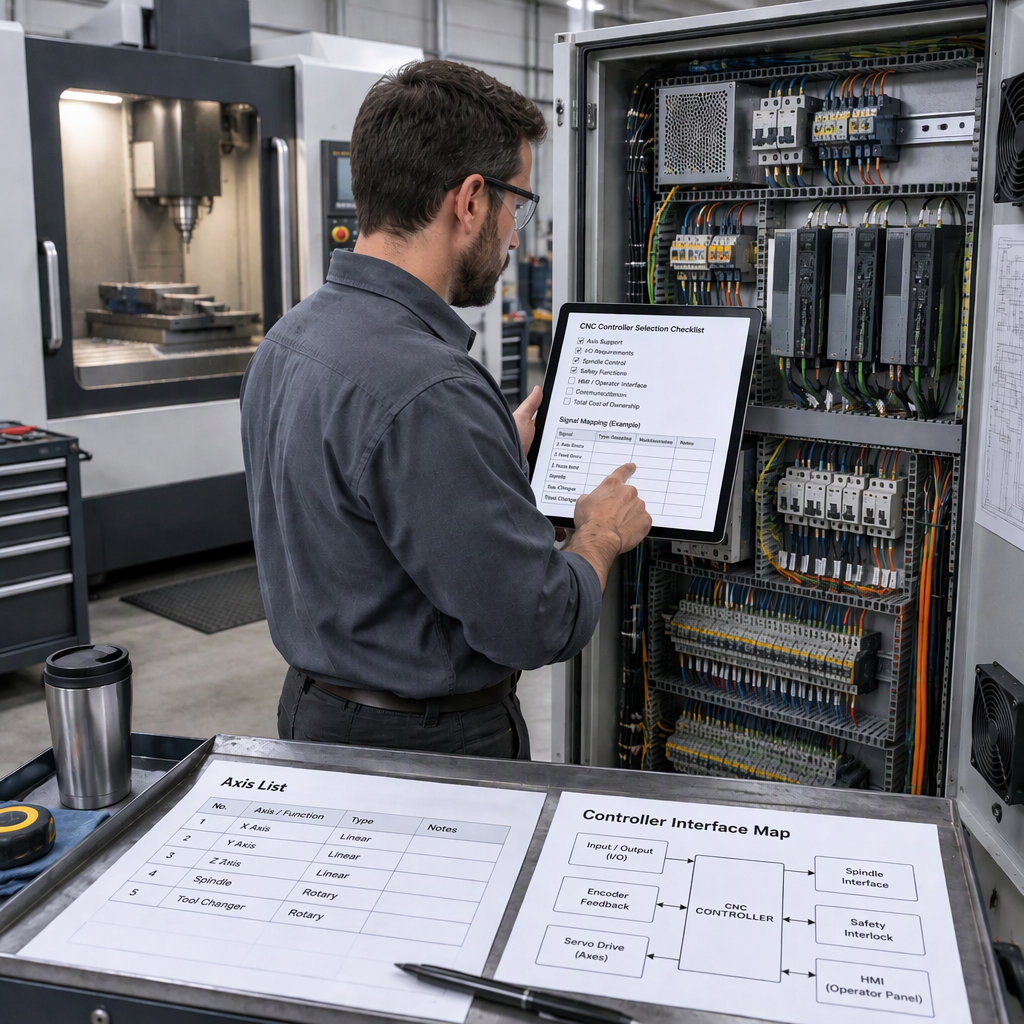
Start with the machine, not the controller catalog
The first selection step is to define what the existing machine must expose to the new controller, because open machine-control architecture depends on usable controller interfaces and validation on real machinery; see the NIST discussion of standards interfaces for machine control.
- List the machine type, axis names, travel directions, homing method and any rotary or special axis that affects motion coordination.
- Record the command and feedback signal categories used by each drive before assuming that a controller can replace the existing control cabinet.
- Identify functions that require PLC, macro or configurable I/O logic, such as tool-change sequences or auxiliary machine signals.
- Before opening an electrical cabinet, touching wiring or manually accessing any powered machine area, switch off the machine and disconnect the applicable mains, battery or stored-energy source; then follow the machine builder’s permitted access procedure.
- Separate what must be preserved from what can be redesigned, because a retrofit quote is clearer when the supplier knows which drives, motors, panels and peripherals remain in scope.
Map every axis and motion requirement before shortlisting controllers
Axis count alone is not enough; the controller must fit the machine’s motion structure, operator interface needs and error-compensation expectations.
- Confirm the total controlled axes and the simultaneous axes required for machining, interpolation or coordinated auxiliary motion.
- Identify whether each axis is linear, rotary, spindle-related or auxiliary, because the drive interface and feedback loop may differ by axis.
- Check whether the integration requires open, documented interfaces for future functions rather than a closed replacement that solves only basic motion.
- Ask how the controller handles user interface, part-program handling and compensation functions that matter to the specific machine class.
- Keep a drawing or table of axis names and physical terminals so the quotation can be checked against the real cabinet instead of a verbal description.
Check drive, feedback and signal compatibility
A controller is only practical for a retrofit when its command outputs and feedback inputs can be matched to the existing drives, motors and wiring plan.
| Interface item | What the integrator should confirm | Why it matters |
|---|---|---|
| Pulse+Direction | Whether the drive accepts step-and-direction command signals and what wiring levels are required. | Mismatch can require drive replacement or an interface converter. |
| AB Phase | Whether encoder-style AB feedback is used and how it is wired back to the controller or drive. | Feedback routing affects position verification and alarm handling. |
| Analog 0–10V | Whether the axis or spindle drive expects analog speed or command voltage. | Analog command use changes noise control, calibration and cabinet layout needs. |
| Servo drive parameters | Existing motor ratings, drive model, alarm output and enable logic. | The controller selection may be correct while the commissioning risk remains high if drive data is missing. |
Do not overlook I/O, PLC logic and auxiliary machine functions
Controller selection should include I/O and PLC capacity because many retrofit problems appear outside the axis loop.
| Machine function | Selection question | Buyer action |
|---|---|---|
| Configurable digital I/O | How many inputs and outputs are needed after retaining limits, alarms, buttons and auxiliaries? | Count real terminals and reserve spare points before quoting. |
| PLC logic | Does the machine need custom sequence logic beyond simple axis movement? | Prepare the existing ladder, sequence notes or timing chart where available. |
| Macro functions | Will the operator or integrator need custom cycles or logic tied to machining operations? | Define the needed cycle behavior rather than asking only for “macro support.” |
| ATC-related functions | Does the machine include an automatic tool changer or tool magazine sequence? | Document sensors, clamps, orientation and safe-state behavior for review. |
Plan robot and production-line integration early
Robot integration changes controller selection when the CNC must exchange cycle, interlock or automation signals with a robot cell rather than operating as a standalone machine.
- If the project includes CNC and robot automation, confirm which device is the cell master and which signals start, stop, pause or recover the cycle.
- Define robot loading, unloading, door, clamp and part-present signals before choosing the controller I/O configuration.
- Check whether PLC and macro functions are needed to coordinate machining cycles with external handling steps.
- Clarify whether integration requires only discrete I/O, a fieldbus, a higher-level cell controller or a custom interface gateway.
- Keep robot-safety validation separate from controller feature selection; the cell layout, guarding and risk reduction measures need project-specific engineering review.
Set safety and cybersecurity boundaries before commissioning
Before commissioning a replacement controller, treat safety and cybersecurity as project boundaries: manufacturing control systems face cyber risk, and NIST SP 1800-10 recommends that organizations first conduct a risk assessment to determine appropriate security capabilities.
For networked controllers, remote access and production-line connections, use NIST SP 1800-10 for manufacturing-sector ICS cybersecurity as a risk-assessment reference, then align the final design with the plant’s own security and maintenance rules.
Use a requirements table to compare controller options
A requirements table keeps the comparison focused on machine fit, interface openness and commissioning risk instead of a simple brand ranking.
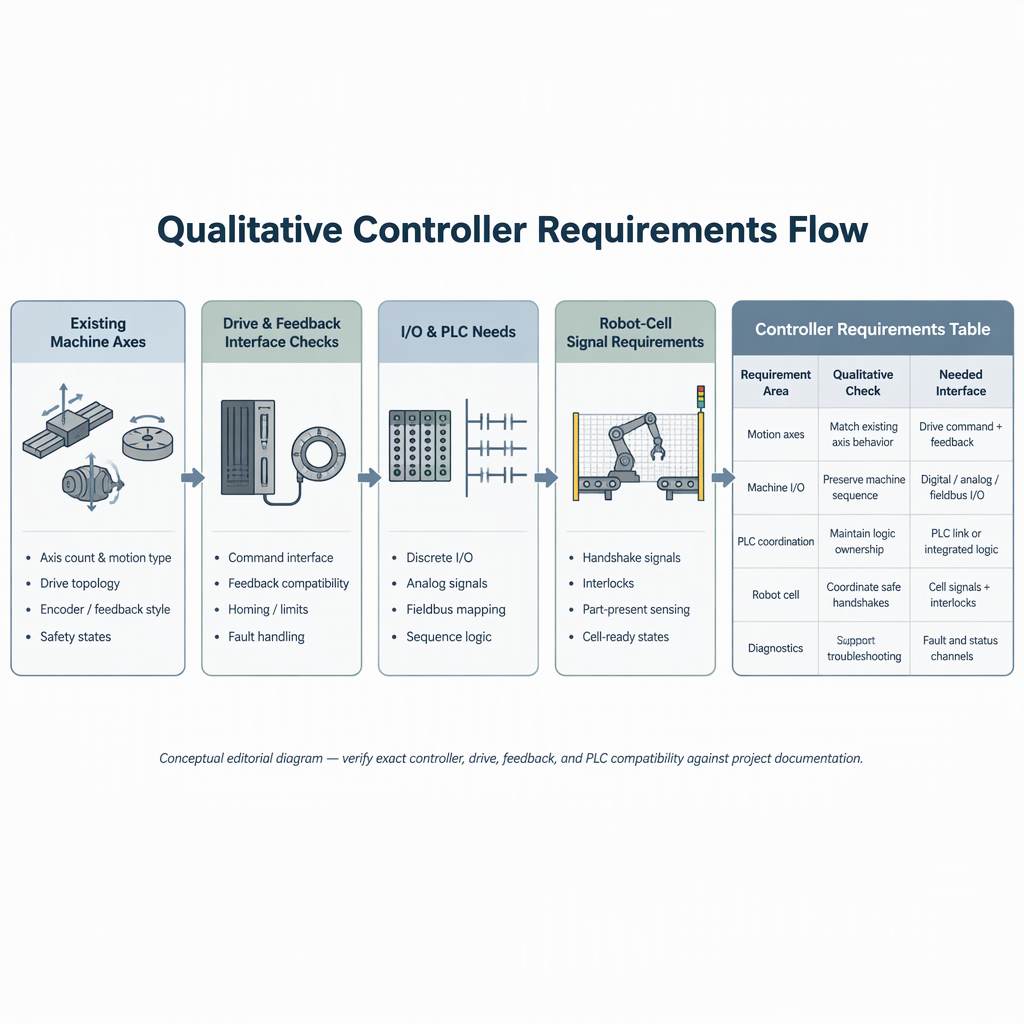
| Requirement | Acceptable answer | Red flag |
|---|---|---|
| Axes and kinematics | Controller supports the required axis count and motion functions for the machine. | Axis count is listed but simultaneous motion or rotary use is unclear. |
| Drive and feedback interface | Signal types such as Pulse+Direction, AB Phase or analog 0–10V match the existing electrical design where applicable. | Supplier cannot map controller terminals to existing drives. |
| I/O and PLC | Enough configurable I/O, PLC and macro capacity is available for auxiliaries. | Auxiliary sequences are postponed until after purchase. |
| Open integration | Documented interfaces are available for functions that must be extended or validated. | Only a generic product name is offered without integration details. |
| Cyber boundary | Network, remote-access and user-management needs are included in a risk assessment. | Connectivity is added during commissioning without security review. |
Prepare these details before asking for a controller recommendation
A supplier can give a more useful recommendation when the request includes the real machine configuration, automation scope and interface requirements rather than only the machine model name.
- Machine type, brand, model, year if known, and the reason for retrofit.
- Axis list, simultaneous motion needs, spindle arrangement and any rotary or auxiliary axis.
- Drive command and feedback types, including whether Pulse+Direction, AB Phase or analog command signals are relevant.
- I/O count, PLC sequence needs, macro requirements and any ATC-related functions.
- Robot, loading system or production-line integration requirements if the CNC will work inside an automated cell.
- Photos of the cabinet nameplates and terminal labels, with power isolated before safe access.
- Required documentation, operator language, training expectations and who will perform commissioning.
Conclusion
The right CNC controller is the one that matches the existing machine’s axes, interfaces, feedback, I/O and commissioning boundary with the least uncontrolled redesign.
For B2B CNC controller selection, start with a machine survey, convert the survey into a requirements table, then compare suppliers by interface fit, integration support and risk boundaries. Do not treat a historical model page or a generic feature list as a guarantee of current availability, compatibility, price, delivery or compliance; confirm those items in the project quotation and technical documents.
FAQs about CNC controller selection for existing machines
These questions help integrators turn a retrofit request into a controller-selection checklist.
What should I check first when choosing a CNC controller?
Check the machine, not the catalog: axis structure, drive command type, feedback routing, I/O, PLC sequences and commissioning responsibility should come before product preference.
Is axis count the same as controller compatibility?
No. Axis count matters, but compatibility also depends on simultaneous motion, drive interfaces, feedback signals, I/O and auxiliary functions.
Which drive signals should I identify before a quote?
Identify whether the machine uses signal categories such as Pulse+Direction, AB Phase or analog 0–10V, and record how each axis is wired.
When does robot integration affect controller selection?
It affects selection when the CNC must coordinate with loading, unloading, interlocks, part-present signals or a broader CNC-and-robot automation cell.
Do cybersecurity checks matter for a CNC retrofit?
Yes, when the controller is networked, remotely accessed or connected to a plant system; include those connections in a cybersecurity risk assessment.
Can a controller replacement bypass existing guarding or interlocks?
No. A controller retrofit should preserve or improve the machine’s safe-state behavior, and any access to powered equipment should begin with switching off and disconnecting the relevant power source before manual work.
How should I use an SZGH controller page during selection?
Use a model page as an interface example for the questions to ask, such as supported signal types and I/O functions, and confirm current availability and project fit directly before purchase.
Should I choose a controller by brand ranking?
For an existing machine, compare controllers by requirements fit: interfaces, motion needs, documentation, commissioning support, integration boundaries and risk controls are more useful than a generic brand ranking.


