


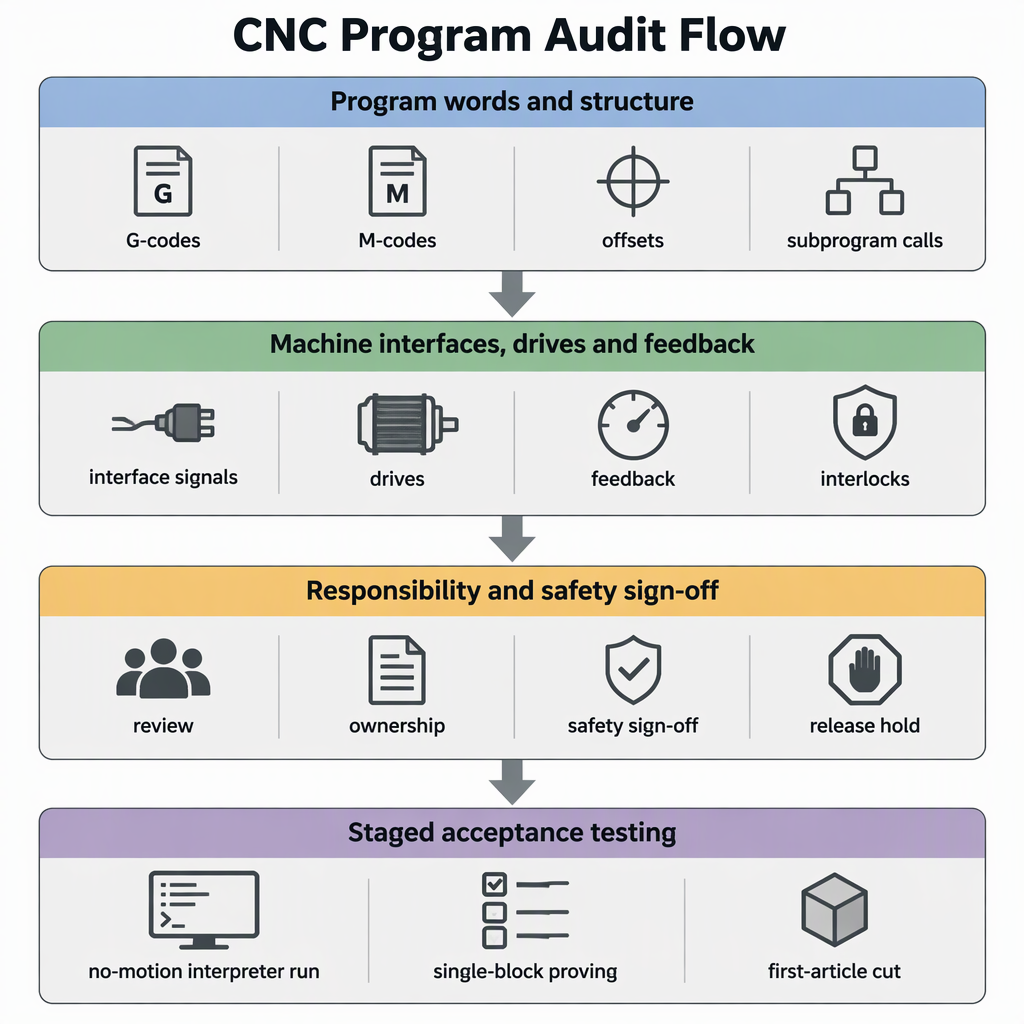
G-code compatible is a claim to test, not a promise to accept. RS274/NGC is one documented dialect in this family: the NIST RS274NGC interpreter report describes an interpreter that reads RS274 code in that dialect with project modifications and drives 3-axis to 6-axis machining centres. Treat a controller replacement as four checks: audit the program library against the candidate's documented command set, match the control, drive and feedback interfaces, agree who owns safety and conversion, then prove the result from a no-motion run to a measured first article before releasing the library. The family name is not the promise; the candidate controller's own documentation is.
Where Controller Dialects Actually Diverge
Motion vocabulary is the least likely source of trouble: rapids, linear and circular moves, feed and spindle commands and work offsets carry the same words in the dialect description and in the implementation documentation linked below. Divergence sits in the details around them — how a tool change ends, which units offsets and tool tables use, which cycles exist, and how subprograms and user-defined codes are numbered. A program can read identically and still cut differently.
The documented RS274/NGC differences of one widely used open-source controller show the pattern to look for, because they change what a program does rather than how it looks: a tool change that no longer returns to the original position, offsets and tool-table values read in machine-configuration units, cycles that are not implemented, and home moves that move only the axes named in the command.
| Program element | Documented difference or addition | Why the result changes | What to confirm before the swap |
|---|---|---|---|
| Tool change | No return to the original position after a tool change | The following move starts from a different point than the author assumed | The position the target controller leaves after a tool change, and whether your programs include an explicit return move |
| Offsets and tool table | Offset and tool-table values are expressed in machine-configuration units | The same stored number can mean a different distance | Which units the replacement reads, and how existing values will be converted |
| Cycles and planes | G87 and G88 boring cycles are listed as not yet implemented, and the G17.1, G18.1 and G19.1 planes are not currently supported | A called cycle can stop the program instead of cutting | A written list of every cycle and plane code your library uses, checked against the supported set |
| Home moves | With G28 or G30 and only some axis words, only those axes move | An axis that used to move may stay put, changing the next operation | Whether unnamed axes move, and whether your programs rely on the previous behaviour |
| Subprograms and user codes | M98 and M99 call and return Fanuc-style sub programs, and M100 to M199 are user-defined codes run as external programs | Call structures and reserved number ranges can differ | Which M-numbers the target reserves, and how it defines subprogram call and return |
How to Inventory and Audit Your Existing Programs First
You can screen a whole library without rewriting it. Build one inventory of every program and its post-processor, extract the distinct words and structures they contain, and classify each against the command set the candidate controller documents — because input that is not explicitly allowed raises an interpreter error, while a code that means something else does not.
- List every program file with its machine, current controller, CAM post and last run date. Unused files can stay out of scope.
- Extract the distinct words in the library: G-codes, M-codes, parameters, work and tool offsets, subprogram calls, macros or o-codes, and file-level structure such as demarcation and program-end characters.
- Classify each word as shared motion, same code with a different meaning, not implemented, or a vendor extension.
- Check each class against the candidate controller's documented command list, and put anything the documentation does not cover to the supplier in writing.
- Score each file run-as-is, convert-once or rewrite-and-repost. That split is the scope you quote and the scope you test.
- Confirm the files are complete: programs use percent-sign file demarcation and end with M2 or M30, so files that were concatenated or truncated during editing need splitting before assessment.
- Treat unknown codes as blocking until proven otherwise, since input that is not explicitly allowed raises an interpreter error.
- Flag the cycles and plane selections your library uses, including boring cycles and the G17.1, G18.1 and G19.1 planes, so they can be checked against the supported list.
- Flag every tool change, offset or tool-table reference and G28 or G30 home move, where documented differences change the result instead of stopping the program.
- Keep the finished audit as a dated document with the file list attached; it is the baseline your on-machine testing is measured against.
Which Interface, Drive and Feedback Checks Decide Feasibility
G-code is only the top layer of the decision. Ask the controller supplier how many axes and which machine types it drives, what command interface and interpolation class it uses, whether your existing drives and feedback devices can be kept, and how an automation cell hands over. SZGH, for example, states that it develops and manufactures its own CNC controllers, servo drives, servo motors and robot controllers together with the control software inside its machines, and that it integrates CNC machines and robot arms on one control platform.
| Check | What the supplier publishes | Decision |
|---|---|---|
| Machine type and axis count | Lathe controllers across 2 to 6 axes, a 6-axis milling controller (SZGH-CNC880MC) and an EtherCAT milling controller (SZGH-CNC1080MIC) | Keep if the machine's axis count and kinematics are covered; stop if the machine type sits outside the published range |
| Command interface and interpolation | The 6-axis milling controller is described with 1 ms interpolation and online PLC editing; the EtherCAT milling controller with 0.25 ms interpolation, ARM+FPGA architecture and spline interpolation | Verify against your surface and cycle-time requirement, and ask which published class your part family needs |
| Drives, motors and feedback | The supplier develops and manufactures its own servo drives, servo motors and robot controllers | Verify whether existing drives and feedback devices stay or are replaced, and what signal the controller expects |
| Automation handshake | CNC machines and robot arms are integrated on one control platform | Verify who owns the sequence, interlocks and safe stop before the cell is quoted |
A program test proves nothing about the machine's inputs, outputs, spindle command, lubrication or safety chain. Each signal must be checked against the machine's own electrical documentation before production release.
Feasibility also has a physical side. Measure the cabinet space for the replacement control and its drives, and confirm mounting space, panel cut-outs and cable entry and bend room against the supplier's published dimensions, not the old unit's footprint. From the machine's electrical documentation, record today's supply — voltage, phases and capacity — and ask the supplier what its control, drives and clamp, brake or spindle circuits need, rather than assuming the existing supply is reused unchanged. Confirm the cabinet removes the added heat and that existing ventilation or cooling still suits the machine's environment. List the services the machine consumes — compressed air, hydraulics, lubrication and coolant — and confirm each stays available and sequenced after the swap. Any check that opens the cabinet begins with switching the machine off and disconnecting it from its power supply so it cannot be re-energised.
Machine-Side and Safety Boundaries to Settle Before You Commit
Name the owners before ordering hardware, because a retrofit with an unclear boundary is where damage lands. The machine owner keeps the machine's safety functions, guards, interlocks, limits and electrical documentation; the controller supplier answers for the control it supplies and the behaviour it documents; the integrator owns program conversion, wiring and commissioning; and the end user's competent person releases the machine for production. Put all four in the project file in writing.
Two boundaries cause most disputes after a controller swap. The first is safety: the machine's emergency stop, guard interlocks and limit functions have to remain effective through the change and be tested again afterwards. The second is verification: ask the machine owner's competent person and your electrical contractor which local electrical and machine-safety requirements apply to the retrofit, record the answer in the project file, and sign acceptance against that recorded answer.
How to Prove Compatibility on the Machine Before Full Cutover
Prove compatibility in stages, on the machine. Start with an interpreter check that raises errors on anything the control does not allow, then verify the flagged codes in single block at low override, and only then cut a measured first article and compare it with the drawing, not the old controller's output.
- Load the programs into the replacement controller and run them through the interpreter without motion; documented input that is not explicitly allowed produces an error, so unsupported words surface here rather than at the spindle.
- Check the tool-change end position and the units used for offsets and tool tables, because the documented behaviour can leave the axes somewhere the program does not expect.
- Prove each flagged code in single block at the lowest feed and rapid override, with the work envelope clear and the operator at the feed hold.
- Cut a first article on non-critical material, measure it against the drawing, and exercise the home moves and cycles your audit flagged.
- Freeze the released program set and record the controller software and configuration version with the test notes.
- Before anyone works inside the cabinet or on the wiring, switch the machine off and disconnect it from its power supply, and confirm it cannot be re-energised. Program testing does not require the cabinet to be open.
- Keep covers and guards in place for every powered test, keep other people clear of the work envelope, and keep a hand on the feed hold and emergency stop for the first run of each program.
- Expect a wrong part rather than an alarm: a differently interpreted tool change or an unimplemented cycle can produce a silent deviation, so compare measured dimensions, not only whether the program ran.
- Repeat the first-article test after any post-processor, offset or parameter change, because each change creates a new program that the earlier result no longer describes.
Conclusion: Compatibility Is Verified, Not Assumed
Approve a replacement when the documents and the machine agree: which program words, cycles and structures the target supports and how its differences change your files; which control, drive and feedback interfaces it matches; who owns conversion, safety and sign-off; and a staged test from a no-motion interpreter check to a measured first article.
A practical decision rule: no file leaves the audit list until it has been scored and proved on the machine, and no machine returns to production until the responsible person signs the test record. Where the supplier's documentation does not answer a question, get the answer in writing and keep it with the audit.
- Audit the program library before quoting the swap.
- Match interfaces, drives and feedback, not only G-code.
- Confirm cabinet space, power supply, cooling and compressed air with the machine's own documents.
- Agree the responsibility boundary in writing.
- Release programs only after a staged on-machine test.
Frequently Asked Questions
These questions cover the checks that decide a replacement: what breaks inside a program library, what happens to post-processors, and how an automation cell changes the picture.
Will my existing programs run unchanged on a replacement controller?
Assume they need proving rather than rewriting. Shared motion words usually move the same way, but a tool change that ends in a different position or offsets read in machine-configuration units changes the part without raising an alarm.
Is there one G-code standard that guarantees compatibility?
No single document makes two controllers interchangeable. The RS274/NGC interpreter report describes one dialect and its modifications, and every controller publishes its own command set, so compatibility is judged between two specific controllers.
Which G-codes and M-codes are most likely to break after a swap?
Tool changes, offset and tool-table units, home moves that move only named axes, boring cycles such as G87 and G88, the G17.1, G18.1 and G19.1 planes, and subprogram or user-code ranges such as M98, M99 and M100 to M199.
Do I need to rewrite CAM post-processors after replacing the controller?
Only if the audit finds words your post emits that the target handles differently or not at all. Some libraries need an output tweak, others a rewritten post; the audit tells the quotation which.
What controller, drive and feedback interfaces must match the machine?
Axis count and machine type, the command interface and interpolation class, whether existing drives and feedback devices stay or are replaced, and how an automation cell hands over. Ask for each answer in writing.
Does a robot or automation cell change the controller checks?
Yes. A cell adds a handshake: which device sequences robot and machine, which owns the interlocks and the safe stop, and who verifies them. Integrated CNC and robot control on one platform still leaves those boundaries for your project to define.
How do I audit a large existing program library quickly?
List the files, extract the distinct words and structures, classify them as shared, differently interpreted, unsupported or vendor-specific, then score each file run-as-is, convert-once or rewrite, and keep the result as a dated document.
How do I test compatibility before cutting a real part?
Run the interpreter with motion disabled, check tool-change end position and offset units, prove each flagged code in single block at low override, then cut a measured first article on non-critical material and compare it with the drawing.
Who is responsible if a converted program or retrofit causes machine damage?
Write it down before ordering hardware: the machine owner keeps safety functions, guards and limits; the controller supplier answers for the control it supplies; the integrator owns conversion, wiring and commissioning; the end user's competent person releases production.
What should we plan for training and downtime?
Plan it as a project task: operators and maintenance staff need time on new screens, alarms and recovery steps, and converted programs need re-proving. Agree the handover and training scope in the quotation.


